



Blog
Media & Entertainment
8 Oct 2026•6 min read
The Broadcast Is Not the Test. It Is the Result of the Test.
By Abhishek Hegde
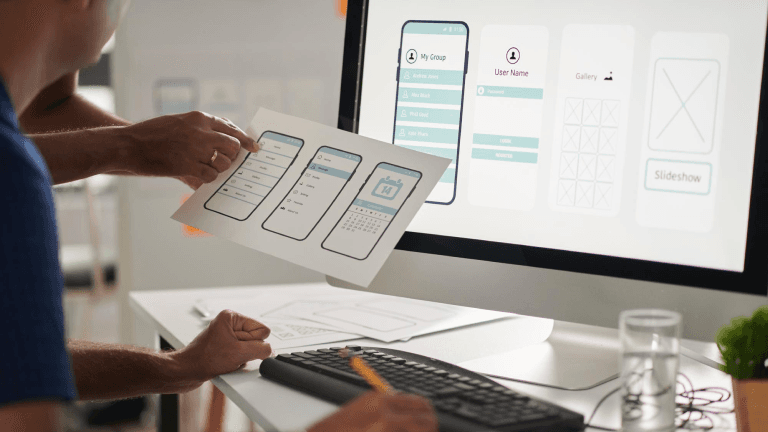
Creating a successful product isn’t just about adding the right features, it’s about ensuring users’ ease and delight in interacting with it. That’s where usability testing comes into play.
This comprehensive guide breaks down the what, why, and how of usability testing to help you design user-centric digital products.
We also introduce our RAPID framework (an easy-to-use design thinking approach).
Usability testing is a structured, user-centric approach to evaluate how intuitive, efficient and satisfying your digital product is. More than just functionality, it’s about observing real people as they try to complete tasks using your product. Where do they pause? What causes confusion or frustration?
It makes you understand the user experience of a particular instance of the prototype you are testing for. Whereas the user interview would provide a holistic view of user psychology.
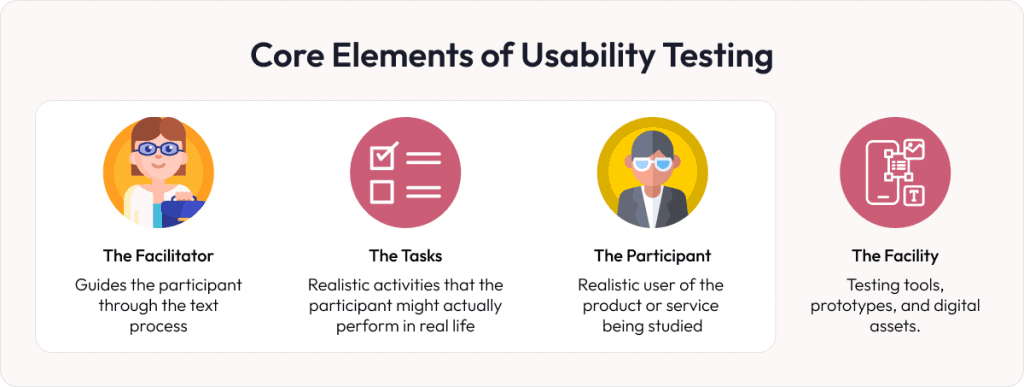
According to the popular user experience community, Nielsen Norman Group, usability testing has three elements. However, we believe there exist a fourth element as the facility:
You might wonder, “If we’ve hired expert UX designers, why do we still need usability testing? Shouldn’t their experience and talent be enough?”
Think of it this way: every choice on the interface has countless variables, and each user brings unique perspectives and preferences. The combination of these factors is vast, and there’s no shortcut around it. Usability testing is the key to unlocking those insights. By observing users engage with your product or service, you get a clear view of what resonates and what needs a second look.
UX often segments customers into continued journey vs drop-offs. Carefully crafted UX walks users toward their goals, whether exploring content, making a purchase, or downloading an app. Visitors who move through your platform easily are far more likely to complete desired actions. Conversely, even minor usability lags can leave potential customers feeling frustrated or lost, leading to high bounce rates and lost opportunities.
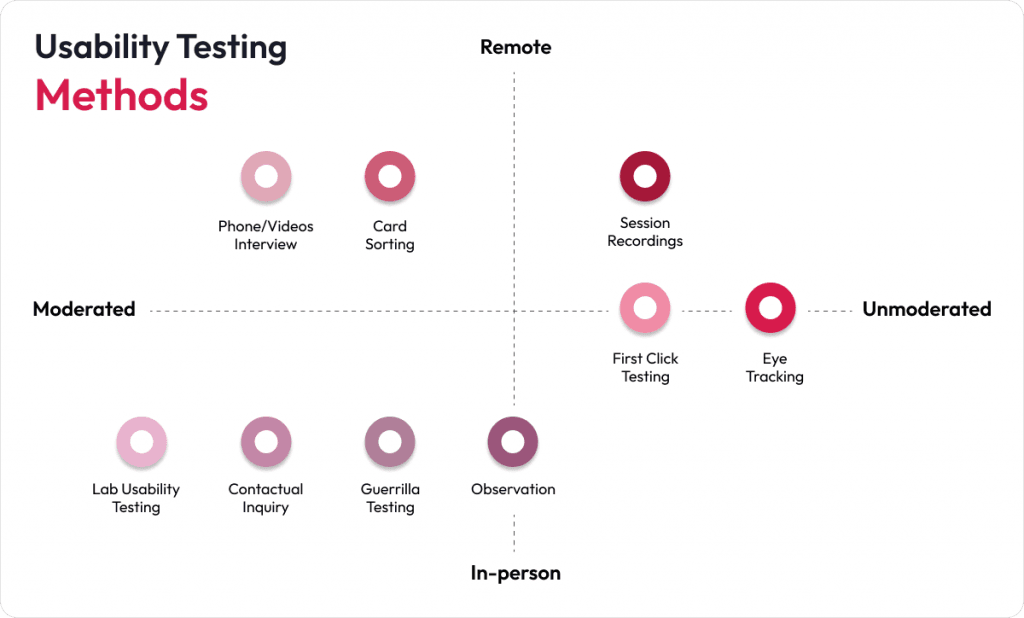
Usability testing transcends the mere act of checking if buttons are clickable or verifying that date fields can be personalized. Instead, it incorporates a range of methods designed to find how users genuinely interact with your product. Below are several core methods to consider:
In this method, you (the researcher) walk participants through a series of tasks, observing their actions and inquiring about their thought processes in real-time. Because you have the chance to ask for clarification, moderated testing works well for complex or lengthy workflows that might confuse new users.
Here, participants complete tasks independently, often through an automated platform. This approach allows for faster feedback and covers a broad spectrum of users, but you lose the ability to ask follow-up questions during the session.
Usability testing can be conducted in person or remotely. These are not separate testing types but delivery modes that complement both moderated and unmoderated formats.
In-person sessions allow you to be physically present with participants, making it easier to observe non-verbal cues like facial expressions, body language, or moments of hesitation. These cues are valuable for capturing deeper user insights.
Remote sessions, on the other hand, are conducted online using screen-sharing tools or dedicated usability platforms. They are ideal for distributed teams, global user bases, or scenarios where logistics make in-person testing impractical.
The journey doesn’t conclude with data gathering. Post-testing, the real challenge begins – analyzing your findings for actionable insights. This is where we can step in.
Effective usability testing goes beyond checklists and surface-level observations. At Robosoft, we follow a proven methodology called RAPID (Robosoft Accelerator for Product Innovation in Digital), a plug-and-play, Design Thinking–based framework.
We have conducted extensive usability testing for a wide range of consumer and enterprise apps. One such engagement was with Motif, a US-based photobook editing app for iOS. Here’s how we put theory into action.
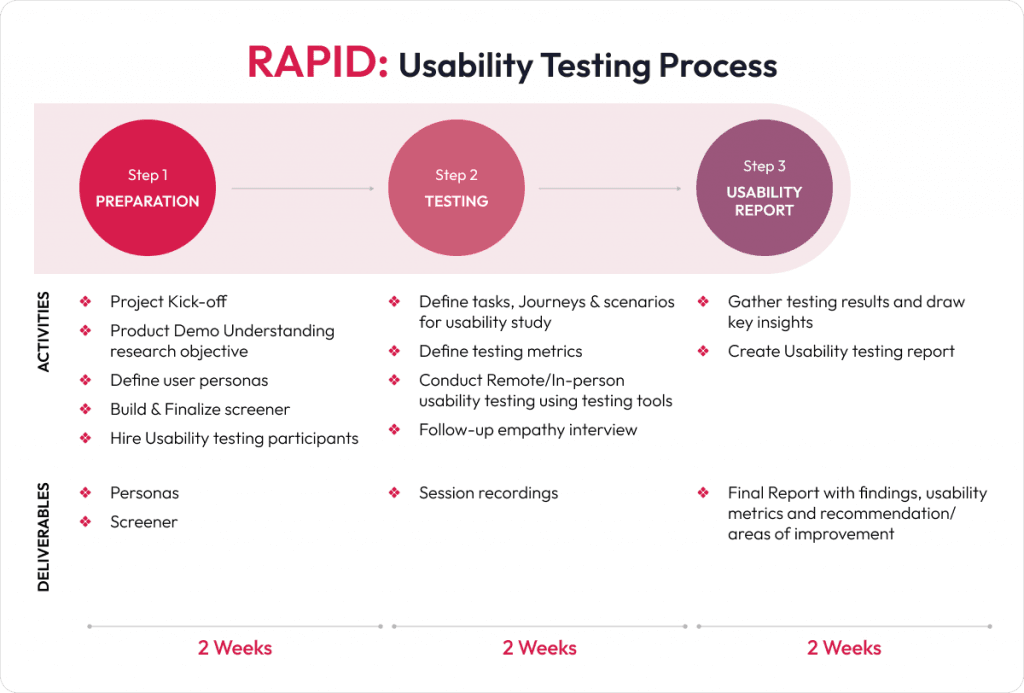
Preparation stage is the foundation of a successful empathy-based usability testing project. It ensures that the research objectives are clear, and the right users are recruited.
For example, in our work with Motif, we segmented users into age-based cohorts (Gen Z, Millennials, and Gen X). Each with different levels of photo-editing experience. This helped us set realistic goals, such as selecting photo book types, uploading images, and customizing layouts.
This phase involves evaluating the live product or prototype to identify usability and product issues.
In Motif’s case, we conducted task-based unmoderated tests where participants interacted with the app on their iPhones and iPads. Tasks included selecting a book type, choosing photos, editing layouts, and checking out. The sessions revealed valuable insights, such as frequent confusion around image selection sliders and theme previews, and helped identify friction points like long loading times during checkout.
This step involves deeper user conversations to explore motivations, challenges, and emotional responses, adding context to what was observed during task completion.
For Motif project, we conducted empathy-driven interviews to understand not just what users did, but also why they performed particular action. For instance, users who skipped the guided tours shared that the language was too dense or repetitive. Others expressed frustration over not being able to preview themes before selection. These emotional insights proved crucial in shaping product-level recommendations.
The final stage involves analyzing the findings and presenting them in a structured report, as well as supporting the planning of the next steps.
Our final report for Motif consolidated effectiveness, efficiency, and desirability scores. We prioritized findings into Must Fix, Should Fix, and UI/UX Upgrades, helping the product team quickly focus on what mattered the most.
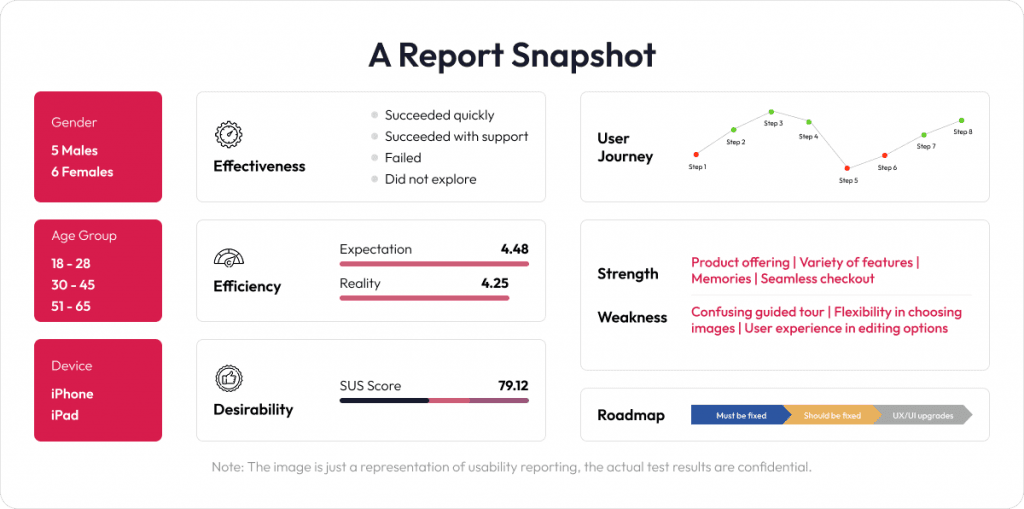
While the above Motif case study offers a glimpse into our usability testing approach, it’s just one of many success stories. At Robosoft, we’ve partnered with several global brands across industries to improve user journeys through thoughtful research and design.
Use these guidelines when planning, conducting, and analyzing usability tests. It focuses on ethical considerations, data accuracy, and meaningful product improvements.
Usability testing is one of the most valuable investments you can make in your product’s success. It helps build customer confidence, identify hidden issues early, and fine-tune the user experience before launch.
Depending on the need and state of the project, usability testing can be conducted for the specific type of results that one intends to get out of it. It does incur initial cost, but the long-term benefits are invaluable.
Once your product moves into the prototype phase (before any code is written), usability study helps validate ideas and gather early feedback on new implementations. Testing at this phase enables faster design iterations and ensures that only user-validated features move forward, reducing rework and saving both time and cost
If you wish to be more closely involved, our RAPID methodology offers a structured, collaborative approach. Both you and your team can observe and analyze test sessions together. Perhaps you are wondering how many users to include, whether you should personally review the findings, or if you would prefer a comprehensive report. You don’t need to have all the answers right now. We are here to guide you step by step. Contact us to explore how usability testing can fit seamlessly into your workflow.


By Vikram Kalle

RESOURCES
By Abhishek Hegde

By Ivan Pinto
Most conversations about AI delivery focus on what the delivery partner brings to the engagement. The methodology, the toolchain, the engineering practice, the governance standards. We have written elsewhere about what Robosoft brings, and about the standard we have built ARIA around.

By Srinidhi Rao
Most organizations evaluating AI delivery partners are asking the wrong question. They tend to ask which tools a firm uses, when the question that actually matters is what standard the firm is operating to.
A tool is a productivity bump. A standard is what shapes whether the work compounds or stays flat. It is, in our experience, much of why AI projects fail to move past the productivity bump. Firms producing genuinely different outcomes with AI today are doing so because the same operating rules run through every decision, every gate and every phase of the work.
Engineering
Human
Experiences
Let’s get in touch
We craft intuitive digital products that blend user-centric design with robust technology. From UX/UI to full-stack development, we help brands turn ideas into scalable solutions.